 11
11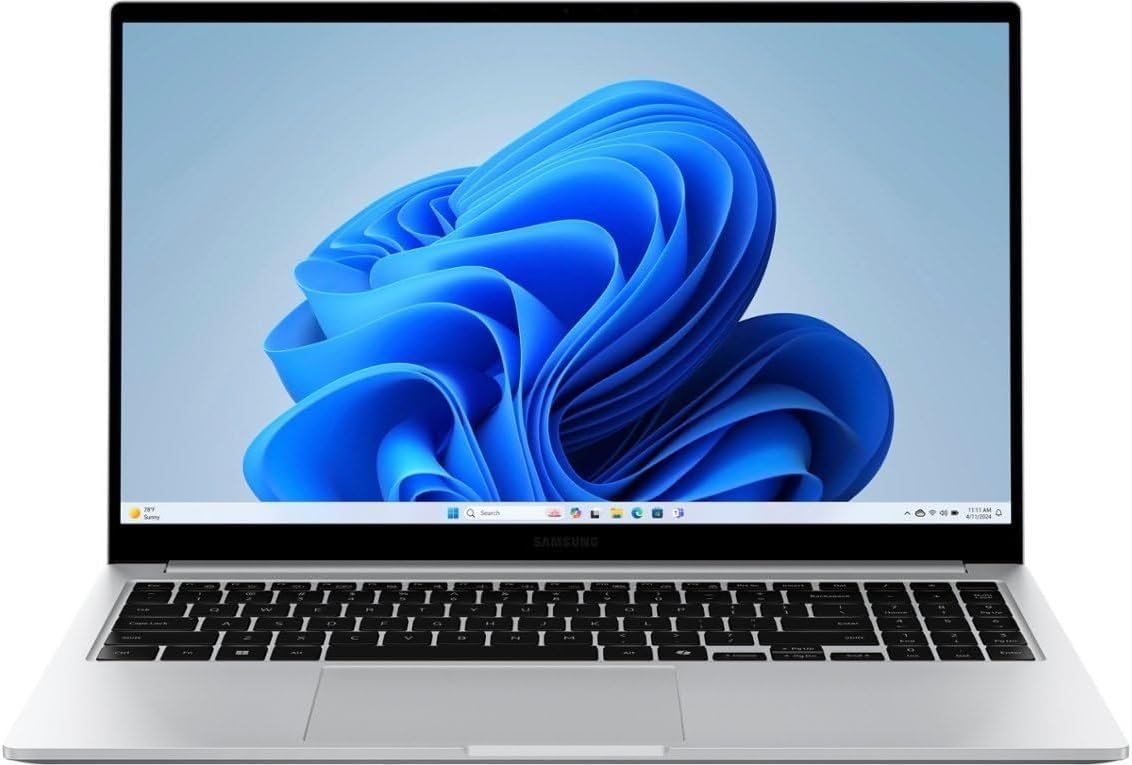
In modern mobile computing, enterprise and business laptops must balance processing efficiency, chassis portability, thermal control, and peripheral expansion. As hybrid work environments demand extended battery longevity alongside multi-threaded application performance, laptop engineering relies on low-power, high-core-count processors paired with integrated memory topologies.
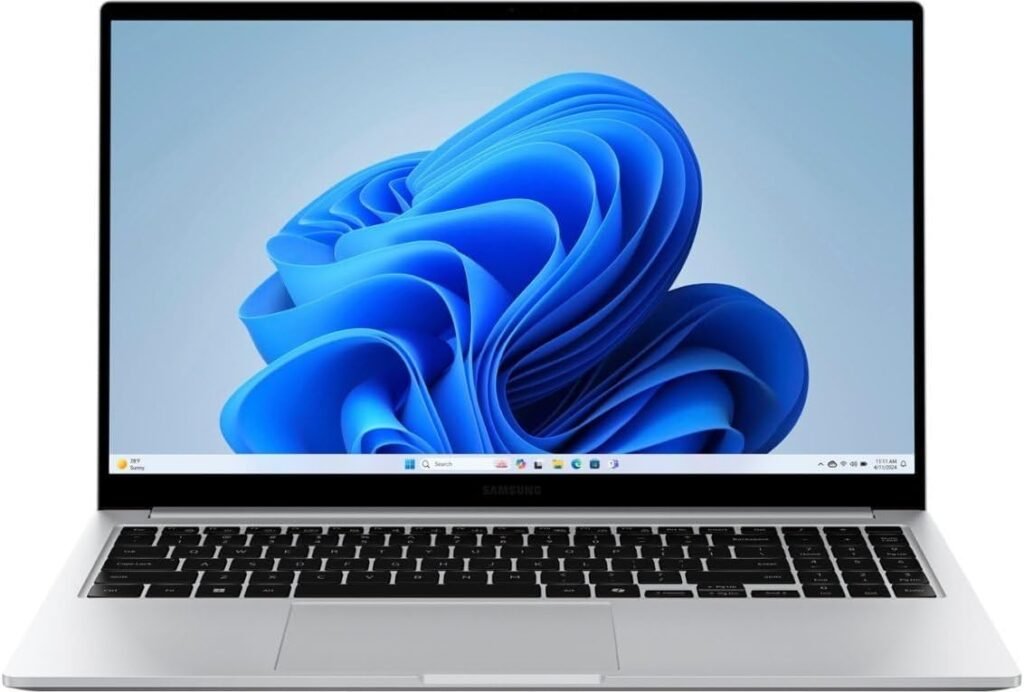
The Samsung Galaxy Book4 (2024 Revision) in its 15.6-inch business configuration combines the Intel Core 7 150U processor, 16GB of LPDDR4x RAM, and a 512GB M.2 PCIe NVMe Solid State Drive within a thin-profile aluminum chassis. Designed around a 15.6-inch Full HD In-Plane Switching (IPS) display, the system integrates essential enterprise security features including hardware-level biometrics, Wi-Fi 6 connectivity, and a full suite of physical input/output ports.
| Hardware Domain | Technical Specification |
|---|---|
| System Model | Samsung Galaxy Book4 15.6″ (2024 Business Revision) |
| Central Processing Unit (CPU) | Intel Core 7 150U (10 Cores, 12 Threads, Up to 5.4 GHz) |
| Graphics Engine | Integrated Intel Graphics (Raptor Lake Architecture) |
| System Memory (RAM) | 16GB LPDDR4x Memory (High-Efficiency Topology) |
| Primary Storage | 512GB M.2 PCIe NVMe SSD |
| Display Panel | 15.6-inch Full HD (1920×1080) IPS, Anti-Glare |
| Wireless Networking | Wi-Fi 6 (802.11ax), Bluetooth 5.2/5.3 |
| Biometric Security | Capacitive Fingerprint Reader integrated into Power Button |
| Physical I/O Ports | 2x USB Type-C, 2x USB 3.2 Type-A, 1x HDMI, MicroSD Reader, 3.5mm Combo Jack |
| Input Devices | Full-Sized Backlit Keyboard with Numeric Keypad, Precision Touchpad |
| Operating System | Windows 11 Home (64-bit) |
| Included Accessory Bundle | 32GB USB Flash Drive |
The primary processing unit inside this Galaxy Book4 configuration is the Intel Core 7 150U, a processor belonging to Intel’s Series 1 mobile lineup built on an enhanced 10nm (Intel 7) process node.
                  [ Intel Core 7 150U Core Topology ]
  ┌─────────────────────────────────────────────────────────────────┐
  │ 2 Performance Cores (P-Cores) | Hyper-Threaded | Up to 5.4 GHz  │
  ├─────────────────────────────────────────────────────────────────┤
  │ 8 Efficient Cores (E-Cores)   | Single-Threaded | Up to 4.0 GHz  │
  ├─────────────────────────────────────────────────────────────────┤
  │ Total: 10 Physical Cores / 12 Execution Threads / 12MB Cache    │
└─────────────────────────────────────────────────────────────────┘The Core 7 150U utilizes a hybrid core arrangement engineered to optimize energy usage while retaining high single-core frequency scaling:
To maximize the power-performance curve under Windows 11, the hardware layer incorporates Intel Thread Director. This micro-controller monitors hardware instruction mixes in real time at the nanosecond level. It provides feedback to the Windows 11 kernel thread scheduler to assign demanding tasks (such as active application windows or compilation scripts) to P-Cores, while background services, virus scans, and system updates are routed to E-Cores.
The Intel Core 7 150U is classified as an ultra-low-voltage (“U-Series”) processor:
The visual interface of the Galaxy Book4 relies on a 15.6-inch diagonal display engineered for office productivity, document processing, and data analysis.
       [ 15.6" Full HD IPS Panel Properties ]
  ┌──────────────────────────────────────────────┐
  │ Native Resolution: 1920 x 1080 Pixels (FHD)  │
  ├──────────────────────────────────────────────┤
  │ Panel Technology: In-Plane Switching (IPS)   │
  ├──────────────────────────────────────────────┤
  │ Aspect Ratio: 16:9 Standard Widescreen       │
  ├──────────────────────────────────────────────┤
  │ Surface Treatment: Anti-Glare Matte Coating  │
└──────────────────────────────────────────────┘In-Plane Switching technology aligns liquid crystal molecules horizontally across the glass substrate. This architecture offers two main visual advantages over older Twisted Nematic (TN) panels:
Operating at a native resolution of 1920×1080 (Full HD), the panel produces a pixel density of approximately 141 Pixels Per Inch (PPI). This spatial density balances text sharpness with low GPU processing overhead, avoiding the higher power consumption associated with 4K mobile displays while allowing native 100% or 125% DPI scaling within Windows 11.
The screen features an anti-glare matte coating that diffuses ambient overhead lighting and window reflections. This reduces eye strain in brightly lit office environments. The panel also incorporates DC-dimming backlighting to eliminate low-frequency Pulse-Width Modulation (PWM) flickering at reduced brightness settings.
Data throughput between the CPU, system memory, and non-volatile storage dictates system fluidity during complex multitasking routines.
The laptop is populated with 16GB of Low Power Double Data Rate 4x (LPDDR4x) memory operating in a high-bandwidth channel configuration.
Primary storage is handled by a 512GB solid-state drive utilizing the M.2 form factor and communicating via the PCI Express (PCIe) Non-Volatile Memory Express (NVMe) protocol.
Graphics rendering in the Galaxy Book4 is managed by the integrated Intel Graphics execution engine built directly into the Intel Core 7 150U processor package.
       [ Integrated Intel Graphics Architecture ]
  ┌─────────────────────────────────────────────────────────┐
  │ Shared System Memory Access (Up to 16GB Allocation)     │
  ├─────────────────────────────────────────────────────────┤
  │ Hardware Decode/Encode: H.264, H.265 (HEVC), VP9, AV1   │
  ├─────────────────────────────────────────────────────────┤
  │ Multi-Display Controller: Supports 4K External Monitors │
└─────────────────────────────────────────────────────────┘The integrated GPU leverages shared system memory, dynamically allocating portions of the 16GB LPDDR4x RAM for frame buffers and texture maps. It operates at dynamic clock frequencies scaling up to 1.30 GHz, handling Windows 11 visual animations, 2D vector graphic tools, and basic 3D rendering.
The processor die includes a specialized hardware video encoder and decoder engine (Intel Quick Sync Video technology):
The integrated graphics controller supports up to three independent displays (the internal laptop screen plus two external monitors) via the built-in HDMI port and USB Type-C DisplayPort Alternate Mode connectors, supporting external 4K resolutions at 60Hz.
The physical construction of the Samsung Galaxy Book4 balances durability, functional heat dissipation, and peripheral connectivity within a thin profile.
                  [ Port & Input Infrastructure ]
  ┌─────────────────────────────────────────────────────────────────┐
  │ LEFT SIDE:  2x USB Type-C, 1x HDMI, 1x USB 3.2 Type-A           │
  ├─────────────────────────────────────────────────────────────────┤
  │ RIGHT SIDE: 1x USB 3.2 Type-A, MicroSD Slot, 3.5mm Combo Jack   │
  ├─────────────────────────────────────────────────────────────────┤
  │ KEYBOARD:   Full-Size Backlit Layout with Dedicated Numpad     │
└─────────────────────────────────────────────────────────────────┘Constructed with a metal alloy chassis finish, the Galaxy Book4 maintains a slim chassis footprint. Passive air intake vents located on the bottom case draw cool air over the internal copper heat pipe assembly before exhausting warm air through hidden vents near the display hinge mechanism.
Unlike ultra-thin laptops that remove traditional connectivity options, the Galaxy Book4 incorporates a robust physical I/O selection:
Security compliance and high-speed wireless connectivity are critical components for enterprise laptop deployments.
       [ Security & Wireless Infrastructure ]
  ┌──────────────────────────────────────────────────────────┐
  │ Biometric: Capacitive Fingerprint Reader (Power Key)     │
  ├──────────────────────────────────────────────────────────┤
  │ Encryption: Discrete Firmware TPM 2.0 Engine             │
  ├──────────────────────────────────────────────────────────┤
  │ Wireless: Wi-Fi 6 (802.11ax) Dual-Band + Bluetooth 5.2    │
└──────────────────────────────────────────────────────────┘Wireless network access is driven by an onboard Wi-Fi 6 network controller:
The Galaxy Book4 features specialized software integration designed for users operating within the wider Samsung Galaxy device ecosystem:
The power architecture of the Galaxy Book4 is optimized for mobile operation using standardized charging protocols.
       [ Power & Charging Architecture ]
  ┌────────────────────────────────────────────────────────┐
  │ Charging Interface: USB Type-C Power Delivery (PD)     │
  ├────────────────────────────────────────────────────────┤
  │ Charger Output: Compact 65W USB-C Adapter              │
  ├────────────────────────────────────────────────────────┤
  │ Battery Type: Internal Lithium-Ion Multi-Cell Unit     │
└────────────────────────────────────────────────────────┘The laptop recharges via either of its two side-facing USB Type-C ports using the universal USB Power Delivery (PD) protocol.
Integrated within the Samsung Settings software suite, Battery Protection Mode allows users to limit the maximum charge capacity to 80% or 85%. This prevents the high-voltage stress that occurs when lithium-ion batteries remain continuously charged at 100% while connected to desktop wall power, extending overall battery lifespan across multi-year deployment cycles.
To clarify system capability across various professional environments, the matrix below details expected hardware behavior and resource utilization under typical computing workloads:
| Workload Category | Hardware Component Utilization | Performance Profile & Suitability |
|---|---|---|
| Enterprise Office Suites (Word, Excel, PowerPoint) | Low CPU load, ~4-6GB RAM usage | Excellent performance. P-Cores handle instant document opening, while E-Cores run background synchronization. |
| Data Analysis & Spreadsheets (VLOOKUP, Pivot Tables) | Moderate multi-threaded CPU usage, ~8GB RAM | High performance. The 12-thread CPU architecture handles multi-threaded calculation pipelines smoothly. |
| Web Browsing & SaaS Applications (30+ Open Tabs) | High RAM usage (~8-12GB), low-to-moderate CPU | Fully capable. 16GB LPDDR4x RAM eliminates memory pagination to the SSD. |
| HD Video Conferencing (Teams, Zoom with Virtual Backgrounds) | Hardware Media Engine + P-Cores | Optimized. Hardware AV1/H.264 decoding offloads GPU/CPU, keeping fan noise low. |
| Light Media Editing & 2D Design (Photoshop, Illustrator) | High CPU single-core load, GPU shared RAM | Suitable for entry-to-mid level photo editing and vector graphic creation at 1080p. |
| Software Development (VS Code, Web Development Suites) | Moderate multi-core CPU usage, ~10-12GB RAM | Capable. Fast NVMe drive speeds up code compilation and local server execution. |
For quick technical reference, the system architecture of the Samsung Galaxy Book4 (2024 Business Revision) is summarized below:
| Architectural Layer | Implementation Details | Engineering Benefit |
|---|---|---|
| Compute Engine | Intel Core 7 150U (10C/12T, up to 5.4 GHz) | Dynamic power scaling via hybrid P-core/E-core execution |
| Memory System | 16GB Soldered LPDDR4x | Low-voltage operation with high memory bandwidth |
| Storage Subsystem | 512GB M.2 PCIe NVMe SSD | High sequential read/write rates for quick system response |
| Visual Interface | 15.6″ Full HD (1920×1080) IPS Anti-Glare | 178° viewing angles with matte glare diffusion |
| Security Layer | Power Button Fingerprint Reader + fTPM 2.0 | Windows Hello biometric authentication & disk encryption |
| Physical I/O | Dual USB-C, Dual USB-A, HDMI, MicroSD, 3.5mm | Native peripheral support without needing dongles |
| Networking | Wi-Fi 6 (802.11ax) + Bluetooth 5.2/5.3 | High-throughput, low-latency wireless connectivity |
| Power System | Universal 65W USB Type-C Power Delivery | Standardized fast-charging across multiple USB-C devices |
The Samsung Galaxy Book4 (2024 15.6″ Business Configuration) represents a balanced mobile computing architecture tailored for everyday productivity, enterprise workflows, and remote business operations. By pairing the energy-efficient 10-core Intel Core 7 150U with 16GB of LPDDR4x RAM and a fast 512GB NVMe SSD, the platform delivers low power consumption alongside responsive multi-threaded performance. Complete with an anti-glare IPS display, robust physical connectivity, biometric security, and full integration into the Samsung Galaxy software ecosystem, the Galaxy Book4 offers a versatile platform for modern mobile professionals.