 11
11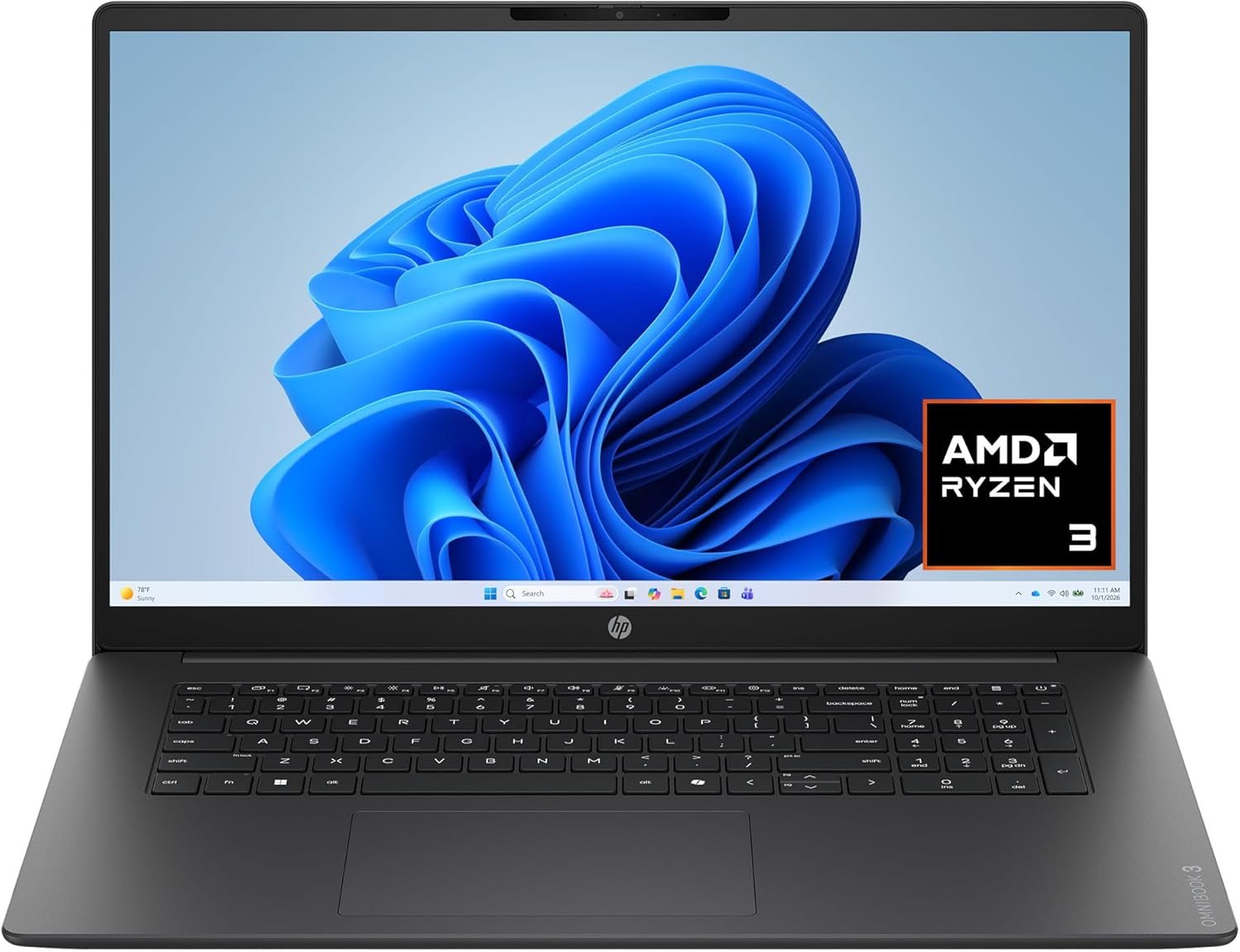
In the modern PC landscape, finding a laptop that balances expansive screen real estate, reliable daily performance, and budget-friendly pricing can be a challenge. Compact 13-inch and 14-inch laptops dominate store shelves, but for home office professionals, students managing extensive research, and everyday users who prefer clear text without squinting, standard screens often feel cramped.
The HP OmniBook 3 17.3-inch Laptop PC (Model: 17-dp0199nr) addresses this exact segment. Positioned as a versatile desktop replacement, this machine combines a generous 17.3-inch Full HD screen with AMD processing architecture, high-speed solid-state storage, and a refined Mica Silver chassis.
Below is an in-depth technical overview, detailed specification breakdown, component analysis, and practical buying guide for the HP OmniBook 3 17-dp0199nr to help you determine if it fits your computing needs.
| Feature | Specification Details |
| Model Name | HP OmniBook 3 Laptop PC (17-dp0199nr) |
| Display | 17.3-inch Full HD (1920 x 1080) IPS, Micro-Edge, Anti-Glare |
| Processor | AMD Ryzen 3 30 (4 Cores, 8 Threads, Up to 4.1 GHz Max Boost) |
| Graphics | Integrated AMD Radeon 610M Graphics |
| RAM (Memory) | 8 GB LPDDR5 High-Speed Memory |
| Storage | 512 GB PCIe NVMe M.2 Solid State Drive (SSD) |
| Operating System | Windows 11 Home |
| Color Finish | Mica Silver |
| Keyboard | Full-Size Keyboard with Dedicated Numeric Keypad |
| Camera & Mic | 1080p Full HD Camera with Physical Privacy Shutter & Dual Digital Microphones |
| Wireless | Wi-Fi 6 / Wi-Fi 7 options, Bluetooth Wireless Card |
| Ports | 1x USB Type-C (10Gbps signaling rate, DisplayPort 1.4, Power Delivery) 2x USB Type-A (5Gbps signaling rate) 1x HDMI output 1x 3.5mm Headphone/Microphone Combo Jack |
| Battery & Power | Fast-Charge Capable (up to 50% in approximately 45 minutes) |
| Starting Weight | ~4.45 lbs (2.02 kg) |
At the heart of the HP OmniBook 3 (17-dp0199nr) is the AMD Ryzen 3 30 processor. Built on AMD’s power-efficient CPU architecture, this chip features 4 physical cores and 8 threads with clock speeds reaching up to 4.1 GHz under boost conditions.
In practical terms, multi-threading technology (allowing each core to handle two streams of data simultaneously) prevents performance bottlenecks during everyday multitasking. Users can keep multiple browser tabs open, stream background audio, edit spreadsheets, and host video calls without experiencing system stuttering. The processor prioritizes high energy efficiency, ensuring thermal stability and extended battery operation without heavy fan noise.
Visual processing is handled by integrated AMD Radeon 610M graphics. Because this GPU shares system efficiency pipelines with the CPU, it delivers reliable graphical rendering without requiring a power-hungry dedicated graphics card.
The Radeon 610M easily manages:
Note: The Radeon 610M is intended for general productivity and entertainment. High-end 3D gaming or intensive 4K video editing software will require dedicated gaming or workstation GPUs.
System responsiveness depends heavily on memory and storage throughput:
The defining characteristic of the 17-dp0199nr model is its 17.3-inch Full HD display.
A 17.3-inch display provides approximately 30% more screen space than standard 15.6-inch laptops and over 60% more space than 13.3-inch ultraportables. This extra physical area changes how you interact with your computer:
The HP OmniBook 3 features a sleek Mica Silver finish. The modern design language uses clean lines, contoured edges, and a matte surface that resists fingerprints and smudges, maintaining a clean look throughout daily handling.
One major advantage of a 17.3-inch laptop chassis is the extra width available for the physical keyboard layout. HP utilizes this space to include:
For students in accounting or mathematics, administrative professionals managing financial spreadsheets, or anyone frequently inputting numerical data, a dedicated keypad saves significant time compared to top-row number keys.
A 17.3-inch laptop is primarily engineered to be a “desktop replacement”—a machine that offers desktop-level screen real estate while remaining easy to move from room to room, desk to couch, or home to office.
Weighing starting around 4.45 lbs (2.02 kg), the HP OmniBook 3 is notably light for a 17-inch device. While it is larger than a traditional backpack-friendly 14-inch ultrabook, its slim profile allows it to slide easily into standard 17-inch computer bags for occasional travel and commuting.
Having versatile port options ensures you won’t need to carry a tangle of adapters or dongles. The HP OmniBook 3 17-dp0199nr provides a balanced array of modern and classic ports:
Remote communication is central to modern learning and working environments. HP equips the OmniBook 3 with:
The HP OmniBook 3 comes pre-installed with Windows 11 Home. Windows 11 offers several productivity enhancements that pair well with a large 17.3-inch screen:
Understanding your primary use case helps determine if the HP OmniBook 3 17-dp0199nr is the right choice.
If your daily routine involves managing emails, editing spreadsheets, drafting reports, and participating in video calls, this machine provides all the necessary tools. The dedicated numeric keypad speeds up data entry, while the 17.3-inch display allows comfortable side-by-side application layout without an extra monitor.
For college or high school students taking online courses, writing research papers, or attending virtual lectures, the OmniBook 3 offers a reliable platform. The 512 GB SSD provides plenty of local storage for coursework, and the 1080p camera ensures professional video presence during online presentations.
Whether managing household finances, browsing the web, shopping online, or streaming movies, the large Full HD screen offers great readability and clear visuals for every family member.
If you want to replace an aging desktop PC and clear off desk space without sacrificing screen size, the OmniBook 3 provides the visual expanse of a desktop monitor in a foldable, moveable laptop package.
| Attribute | 17.3″ HP OmniBook 3 | Standard 15.6″ Laptop | Compact 14″ Laptop |
| Screen Area | Maximum workspace (Large text/dual window) | Balanced workspace | Compact workspace (Single window focus) |
| Numeric Keypad | Dedicated full-size keypad included | Often included | Rarely included |
| Portability | Designed for home/office mobility (~4.45 lbs) | Standard portable (~3.8 lbs) | Ultra-portable (~3.0 lbs) |
| Ideal Primary Use | Desktop replacement, data entry, home office | General travel and everyday office | Frequent travel, coffee shop work, commuting |